
Bulk Sending
Currently you are able to do Bulk Mailshots from any of the 'list' screens Contact List, Applicant List, Property List within Acquaint Web.
Using the list screen you can use the filters to select the Contacts you want to send a Letter, Email or SMS Text to.
If you wish to select specific Contacts you can do this using the Filter Rows option as well.
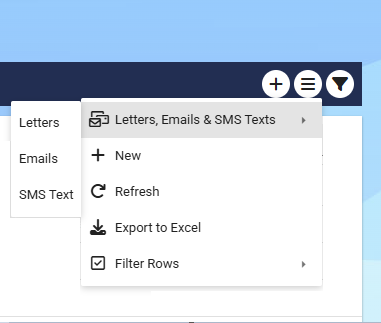
Letters - the letters will have been merged into MS Word and can be viewed on screen before Printing. (If the template is a .doc it’ll be downloaded, if it’s a .docx it’ll show on your screen)
Emails - the Email template screen will pop up and you can select the email template you wish to use, once written out the email can previewed on screen before clicking Send.
SMS Text - the SMS Texts can be previewed before clicking Send.