
Certificates
Certificate Management in Acquaint Web
Acquaint Web securely stores key certificates and documentation to help you track and manage expiry dates. This includes:
Gas Safety Certificates
Electrical Safety Certificates
HMO Licences
Landlord Registrations
Property Licences
Legionella Risk Assessments
Proof of ID
Right to Rent documentation
Insurance Premium Records
This ensures you're always up to date with regulatory requirements and essential property compliance.
Managing Certificates
All Certificates can be managed from the Certificates List screen, which you can access via the Certificate List option in the side navigation bar.
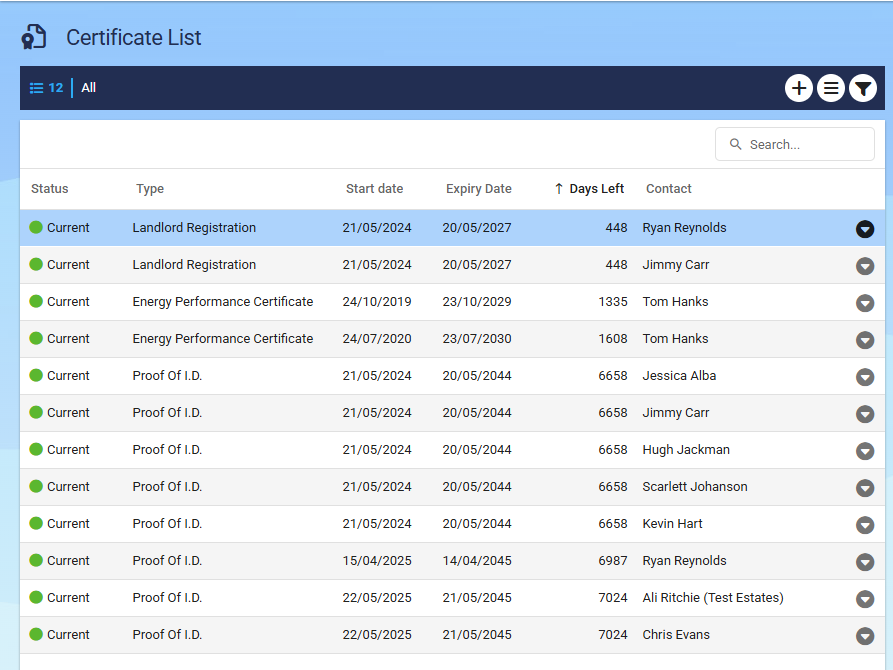
Filtering the Certificate List
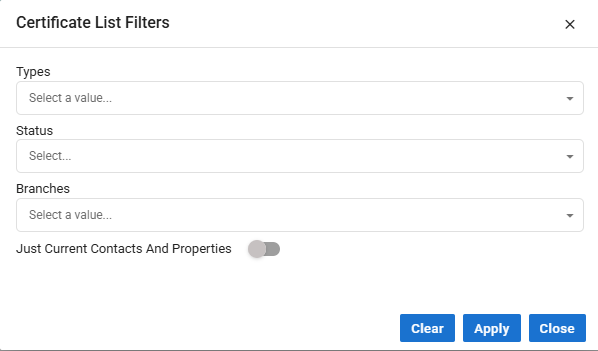
You can apply filters to the Certificate List to focus only on relevant documents, making it easy to hide expired or archived certificates.
Available filters include:
Type – Filter by certificate type (e.g. EPC, Gas Safety, etc.)
Status – View certificates marked as Current, Expired, or Archived
Branch – If operating across multiple branches, filter by a specific location
Current Contacts & Properties Only – Display certificates linked to active records
Certificate Setup and Automation
Reminders will not appear for properties marked with a Property Status of Archived.
You can also create custom Certificate Types as needed to fit your processes.
The fields Date Added, Date Updated, and Added By are updated automatically, no extra input required.
When you've completed your changes, click Save to apply.

Acquaint includes several default Certificate Types to get you started.