
Maintenance Requests

Acquaint includes an Online Maintenance Request service which is included at no extra charge as part of your package.
Tenants can conveniently report maintenance issues online using a desktop, tablet, or mobile device. These requests are automatically imported into Acquaint every 30 minutes and appear as reminders on your Home Page, allowing you to:
Assess the urgency and importance of each issue
Choose to accept the request and automatically generate a Work Order
Or reject the request and send a response email to the tenant
Activating Online Maintenance Requests
To enable this feature, a button or link must be added to your website.
For Bright Logic websites, contact: design@brightlogic.co.uk
For websites built by third-party providers, they must link to the following URL:
https://webutils.acquaintcrm.co.uk/maintenancerequests.aspx?siteprefix=SITEPREFIX🔧 Replace
SITEPREFIXwith your actual site prefix to ensure proper integration.
Processing Online Maintenance Requests in Acquaint
Acquaint automatically monitors for new maintenance requests submitted online. When a new request is received, a notification alert will appear to tell you of the issue. You will find the alert in the top right of your screen with the bell icon. Once the Process Maintenance Requests have been opened you will be able to choose what happens after using the menu option.
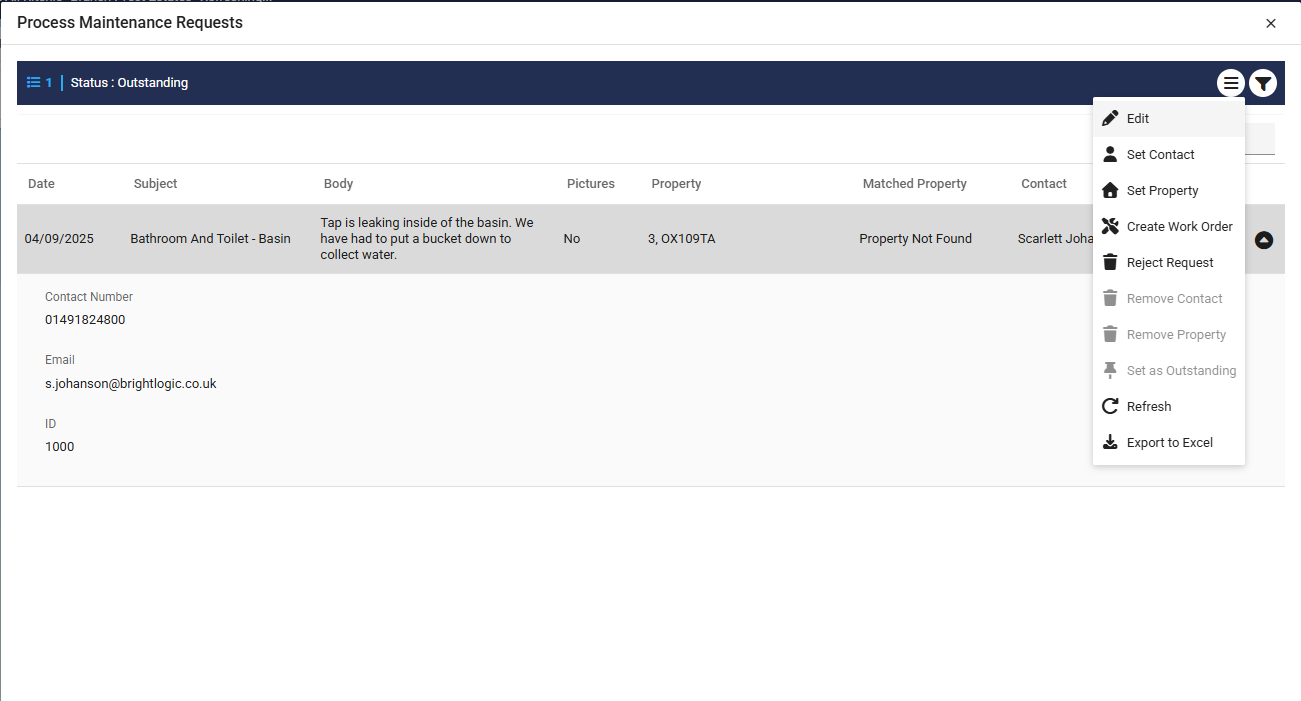
Accessing Maintenance Requests
You can also view and manage maintenance requests manually:
From the left hand menu, under the Property Management tab, click Maintenance Requests
From the Reminders page, under the Property Management tab > Click Maintenance Requests to Process