
Property Offers
Whether you're buying, selling, or renting - an offer is essentially a formal proposal made by a potential buyer or tenant to secure a property, usually at a specific price and under certain conditions. Here's how it works in both sales and lettings:
🏠 Property Offers in Sales
When someone wants to buy a property:
They submit an offer to the seller (usually through the estate agent).
The offer includes the price they’re willing to pay and sometimes conditions (e.g. subject to survey, mortgage approval, or sale of their own home).
The seller can accept, reject, or negotiate the offer.
Once accepted, it becomes the basis for the legal process (conveyancing), but it’s not legally binding until contracts are exchanged.
💡 Example: A buyer offers £270,000 for a cottage in Cholsey listed at £280,000. The seller might accept if they’re keen to move quickly.
🏡 Property Offers in Lettings
When someone wants to rent a property:
They make an offer to the landlord or letting agent, usually including:
The monthly rent they’re willing to pay.
The move-in date.
Any special requests (e.g. pets, furnishing).
The landlord can accept, counter, or decline.
Once accepted, referencing and tenancy agreements follow.
💡 Example: A tenant offers £1,100/month for a 2-bed flat in Glasgow, with a request to move in early and keep a small dog.
The Offers made tab displays a grid of Offers made against a specific Property.

For each Offer the following information will be displayed:
Offer Date
Amount
Contact
Status
Details
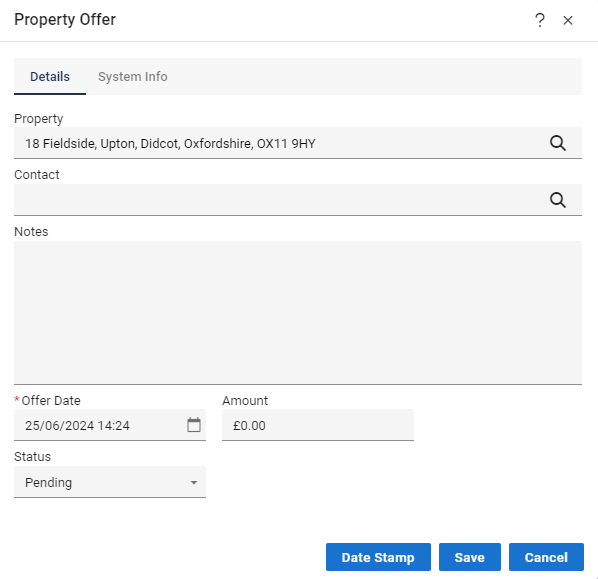
When you go to make a Property Offer you will see the “Details” tab first.
This is the information you need to make a relevant Offer for the property.
The System Info tab
All Offers related to the Contact and Property are stored.
ID - a unique system ID is automatically assigned to the Offer.
Added By - the User that added the Offer.
Date Updated - the date is stored when the Offer is changed.
Status Changed - the date is store when the Status is changed.