
Tenancy List
The Tenancy List displays a list of all Tenancies, this includes all statuses and management types (these can be filtered).
The following information will be displayed for each tenancy.
Status
Start Date
End Date
Auto Renew
Next Inspection Due
Next Review Date
Amount
Commission (Comm.)
Frequency
Benefit
Benefit Frequency
Property
Landlord
Tenant

If some fields do not display, the information's width likely exceeds the limit, causing them to be hidden under the down arrow on the right of the tenancy. (see image for reference)
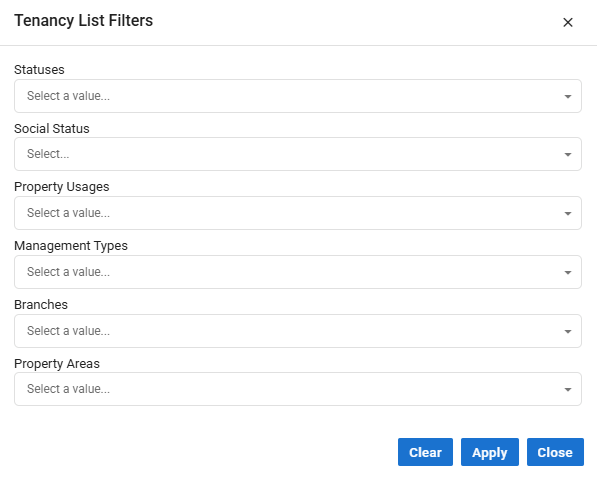
The screen can be filtered on the following:
Statuses
Current
Notice Served
Tenant Leaving
Tenant Renewing
Cancelled
Pre-Tenancy
Expired
Social Status
Property Usage
Management Types
Branches
Property Areas
Menu options that are currently available are as follows:
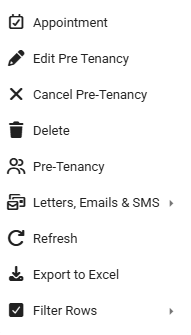
Appointment - takes you to the diary to create an appointment for the selected (highlighted) tenancy
Edit Pre-Tenancy - Opens the Edit Pre-tenancy screen. (only active when selected tenancy is a pre-tenancy)
Cancel Pre-Tenancy - Opens the Cancel Pre-tenancy screen (only active when selected tenancy is a pre-tenancy).
Delete - Will produce a pop up. This will first give you run down of what deleting the tenancy will do, and gives you a yes/no option. (selecting yes will give you another ‘Are you sure message’).
Pre-tenancy - Brings up the Pre-tenancy screen, here you can create a new pre-tenancy.
Letters, Emails & SMS - will give an option to produce a letter/email/text for a tenant or landlord.
Refresh - Refreshes the table
Export to Excel - exports the current grid to Excel with headers.
Filter Rows - allows the user to use multiple selection (include more than one tenancy at time)