
Filtering Property List
🔍 Filtering Options in the Property List
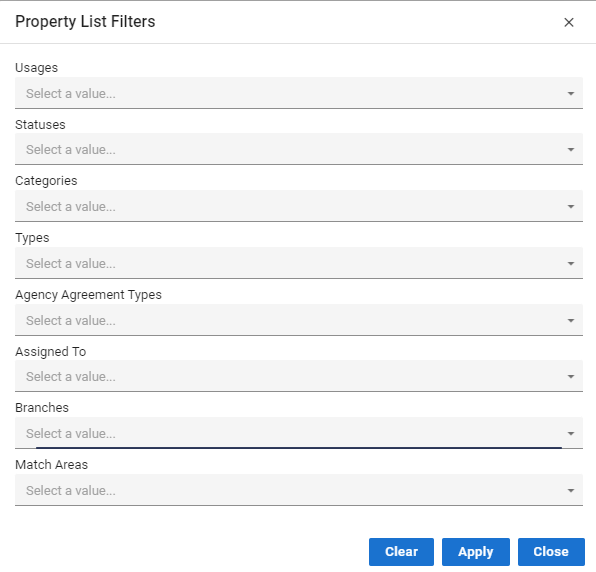
The Property List in Acquaint Web offers a wide range of filters to help you quickly locate and manage specific records. These filters support efficient navigation and targeted searches for marketing, reporting, and operational workflows.
🏢 Usage
Residential
Commercial
📊 Status
Available
Under Offer
Completed
Not Available
Valuation
Archived
Instructed
Bank Valuation
🏷️ Category
For Sale
To Let
📑 Agency Agreement Type
Sole
Joint Sole
Sole Selling Rights
Multiple
Sub Instruction
👤 Assigned To
The user currently responsible for the Property record
🏬 Branches
Corresponds to the branch the Property has been assigned to
📍 Match Areas
Target geographic or interest areas for marketing purposes and applicant matching
✅ Tip: Combine multiple filters to refine your search and streamline property management - ideal for progressing listings, reviewing performance, and planning outreach.
📋 Sorting & Searching Properties in the Property List
The Property List offers flexible tools for organising and locating property records efficiently.
🔽 Ordering Properties
You can sort the list by clicking on any of the column headers:
Picture
Address
Beds
Price
Type
Category
Status
✅ Tip: Click a column header once to sort ascending, and again to sort descending—perfect for quickly finding highest prices or available properties.
🔍 Searching for a Property
Use the Search bar to locate a Property by:
Address
Property ID
Or other key identifiers
💡 Great for quickly jumping to a known listing or filtering by street name or reference number.
