
Uploading Properties
🌐 Uploading Property Details to the Web and Portals
Acquaint Web supports seamless uploading of property details to your:
Hosted Website (if managed by us)
Web Servers
Subscribed Internet Property Portals
Portal Uploading
Our automatic Portal uploading system pushes your property data to subscribed portals and social media platforms.
Key Notes:
This is an optional monthly service (pricing available on request)
Acquaint supports a wide range of UK Property Portals - [view the full list here]
To set up a new portal:
Contact the Portal's Account Manager
Mention that your feed source is Acquaint
The portal will typically email Acquaint Support with your Feed ID to complete the connection
✅ Once configured, properties are automatically uploaded with minimal manual intervention.
Web Uploads (Every 15 Minutes)
Property uploads to your website occur automatically every 15 minutes.
By default, only properties marked as Available are uploaded.
However, you can customise system settings to include:
Sales properties under offer
Rental properties under offer
⚙️ Per-Property Web Upload Settings
Each property includes its own Web Upload tab in the main header, offering individual control:
Option | Description |
Based on Status | Default upload behaviour |
Always Upload | Upload regardless of status |
Never Upload | Prevent upload regardless of status |
Always Upload As Available | Upload with “Available” status even if under offer |
Just My Website | Upload only to your website, not to external portals |
Just to Portals | Upload only to portals, not your website |
Available Until Exchanged | Treat under-offer sales as “Available” until exchange date (can also be set globally in System Configuration) |
What’s Included in the Upload
Each property upload includes:
Descriptions
Pricing
Room Details
Directions
Images
Floorplans
🚫 Portal Exclusions
If you’re subscribed to portal uploading and wish to exclude specific properties from certain portals:
Go to the Portal Exclusions section
Click the Edit (pencil icon)
Use toggles to control visibility per portal
Click Save to confirm
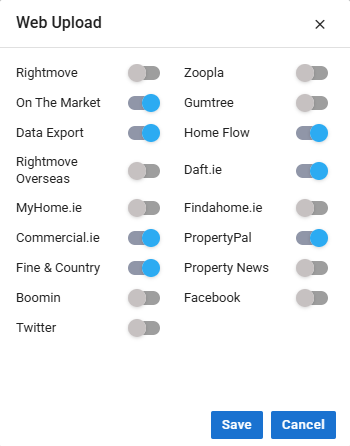
💡 Useful for managing portal-specific listings or handling premium vs. basic promotions.
⚠️ Web Upload Restrictions & Warnings
To ensure compliance with Trading Standards regulations, we’ve removed the option to upload properties using the ‘Summary Upload’ method. This change helps safeguard data accuracy and protects your listings from non-compliant publication.
New Web Upload Warnings
If your property isn’t appearing on your website or portals, our new Warnings Card helps identify the reason.
For example:
This property cannot be uploaded to the Internet, as the following information has not been entered:
Price
Description
The Warnings Card displays critical missing information, allowing you to correct issues quickly and ensure your property is eligible for upload.
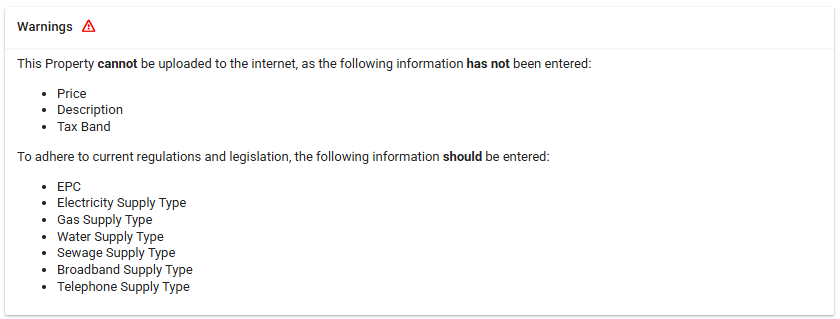
✅ Tip: Always review the Warnings Card before publishing to avoid delays or omissions.