Sign In
🌐 Step-by-Step: Logging into Acquaint Web for the First Time
Open your browser Launch your preferred browser on your device (e.g. Chrome, Edge, Safari).
Enter the login URL In the address bar, type: Acquaint Web Press Enter to load the page.
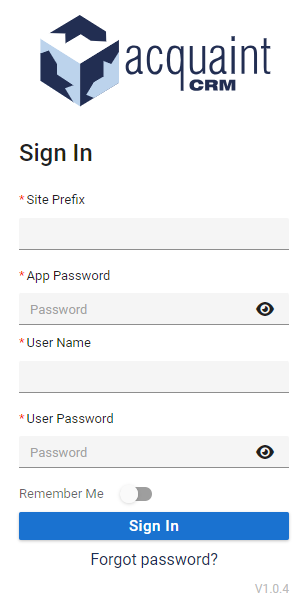
Arrive at the Sign In screen You'll be greeted by the Login Form, where you'll enter your access credentials.
Enter required user details Since it's your first login, you'll be prompted to enter:
Site Prefix – unique identifier for your agency’s portal
App Password – associated with your overall access
Username – your personal login ID
User Password - Your password you use to login to Acquaint [Set a Password in Acquaint]
Click ‘Sign In’ Once all fields are completed, click the Sign In button to proceed.
Verify access and begin using the app If details are correct, you'll be logged into Acquaint Web and can begin exploring its features.
🚀 Step-by-Step Login Guide
🔗 1. Open the Login Page
Type the following URL in your browser's address bar: https://app.acquaintcrm.co.uk/login-form
🧾 2. Enter Your Login Credentials
Provide the required details:
Site Prefix – 4-character code from your installation email
App Password – provided via email (contact support if missing)
User Name – found in your Contact record in Acquaint
Password – the one you set for your User profile
✅ Need help finding your User ID? In Acquaint:
Click Find → enter your name → double-click your record → check User Settings
💡 3. Optional: Save Your Details
Toggle the Remember Me slider to retain login credentials for future sessions.
✔️ 4. Sign In
Click the Sign In button. Once authenticated, you’ll land on your Home Page—ready to explore!
🔐 Password Setup Required for Acquaint Web Access
To access Acquaint Web, each user must have a password set up in the desktop version of Acquaint CRM.
If a password is not configured, the user will be unable to log in to the web app.
🛠️ How to Set Up Your User Password in Acquaint (Desktop)
Launch Acquaint CRM on your desktop
Go to the Find screen and search for your name
Double-click your Contact record to open it
In the User Settings tab, locate the Password field
Create and enter your desired password
Click Save to apply the changes
✔️ Once your password is set, you can log into Acquaint Web using your credentials.
Install the App on Desktop or Mobile